Preceptor Dashboard Overview
Preceptor Dashboard Overview
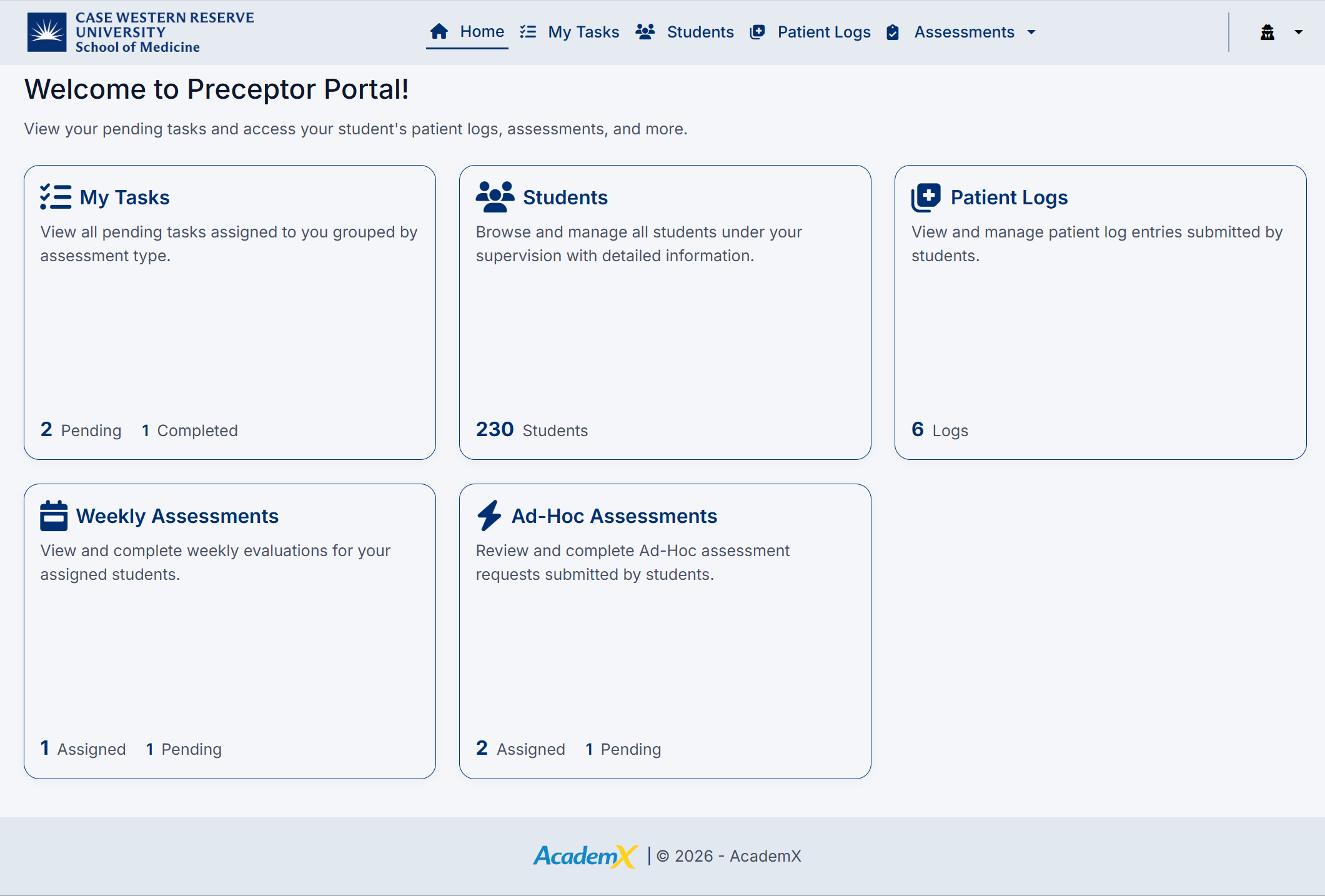
The Preceptor Dashboard is the central hub for managing your students, reviewing patient logs, and completing assessments. It provides a clear summary of your responsibilities and quick access to key areas of the system.
From the dashboard, you can view pending tasks, access student information, review patient logs, and complete required assessments.
Dashboard Sections
The dashboard is organized into tiles, each representing a key function:
My Tasks
Displays all tasks assigned to you, grouped by assessment type.
- View the number of pending and completed tasks
- Quickly access assessments that require your attention
- Click the tile to open your task list
Students
Provides access to all students under your supervision.
- View the total number of assigned students
- Browse student details and access their assessments
- Click the tile to navigate to the Students page
Patient Logs
Allows you to review patient encounters submitted by students.
- View the number of available patient logs
- Access logs to support assessment completion
- Click the tile to open the Patient Logs page
Weekly Assessments
Access and complete weekly evaluations for your students.
- View the number of assigned and pending weekly assessments
- Click the tile to navigate directly to Weekly Assessments
Ad-Hoc Assessments
Review and complete assessment requests submitted by students.
- View the number of assigned and pending ad-hoc assessments
- Click the tile to open the Ad-Hoc Assessments page
Navigation Bar
At the top of the screen, the navigation bar provides access to:
- Home – Return to the dashboard
- My Tasks – View and manage assigned tasks
- Students – Browse students under your supervision
- Patient Logs – Review student patient encounters
- Assessments – Access all assessment types (All, Weekly, Ad-Hoc, Mid-Rotation)
Using the Dashboard
The dashboard is designed to help you:
- Quickly identify pending assessments
- Access relevant student and patient information
- Navigate efficiently between key areas
- Stay up to date with your evaluation responsibilities
The Preceptor Dashboard provides a streamlined overview of your workload, helping you efficiently manage assessments and support student development.
Created with the Personal Edition of HelpNDoc: Easy Qt Help documentation editor